
STOP JUGGLING TWO TOOLKITS?! One IDE — a GTK Designer, 194 Hand-Drawn X11 Widgets, and a GDB Debugger That Watches Every Variable!
FDesigner and XFrame are now one IDE: a GTK designer, a 230-entry palette, a layout window for 194 hand-drawn X11 widgets, code generation, CMake builds, and a GDB stepping debugger — open source on GitHub.
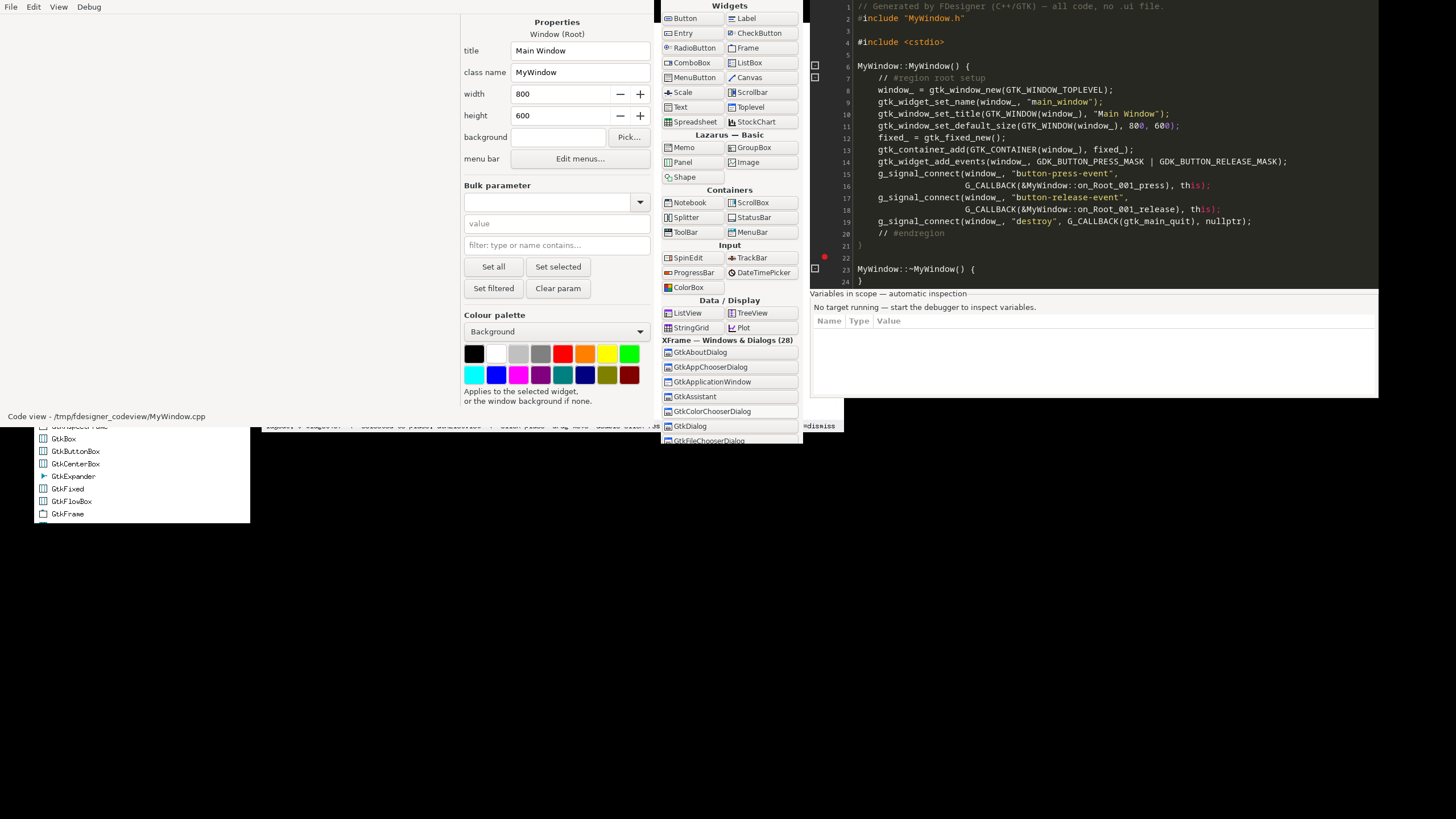
Two projects that started life as separate tools now live in one repository, behind one launcher, as one IDE. On one side, FDesigner — a C++/GTK 3 visual designer with a built-in GDB stepping debugger (article #10). On the other, XFrame — 194 widgets drawn by hand with raw Xlib calls, no toolkit at all (articles #11–19). The combined IDE puts them together: design a form, place widgets from a palette that holds 230 entries, generate compilable C++ code, build it with CMake, and step through it with the debugger watching your variables for you.
It is one repo, github.com/cnmcdee/CWidgets, one build (make), one launcher (./ide). And it is honest about where the two halves join and where they do not — the seam between the XFrame layout window and the designer is a converter, not a live bridge, and this article says so plainly, with the exact numbers.
Five Windows, One Launcher
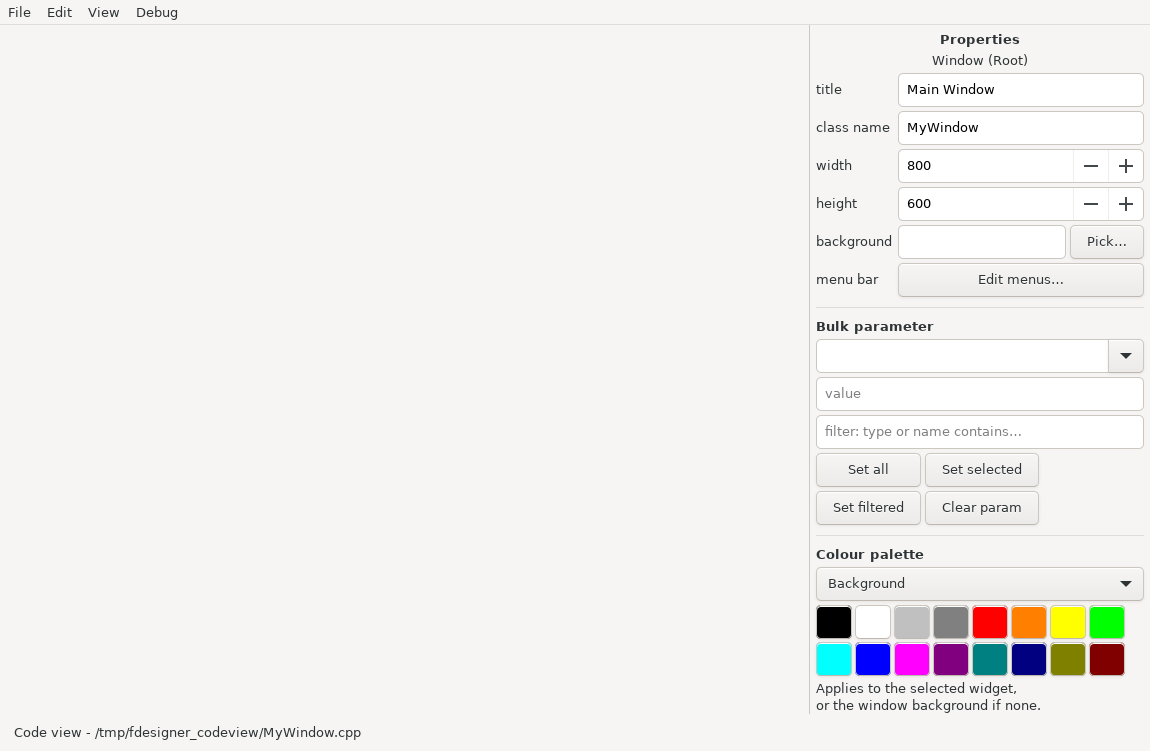
./ide builds anything missing first (--build forces a rebuild), then opens five separate top-level windows at once. Each is a plain top-level window — never transient or modal — so they coexist on one X display, and closing one only hides it; its View-menu entry brings it back. Closing the designer ends the session.
| Window | Title | Size | What it is |
|---|---|---|---|
| Designer | FDesigner — C++/GTK — <name> | 1150×720 | Canvas, property editor, Events pane, menus |
| Widget palette | FDesigner — Widgets | 250×780 | Combined palette, 230 entries — 36 FDesigner buttons + all 194 XFrame widgets in their 9 sections, each with its 16×16 icon; the window scrolls |
| Code inspector | FDesigner — Code | 1000×700 | Generated C++ with gutter, folding, themes, breakpoints, automatic variable inspection |
| XFrame palette | CWidgets Palette - 194 widgets | 380×880 | All 194 XFrame widgets in 9 collapsible sections, each with its 16×16 icon (cwidgets_palette) |
| XFrame layout | CWidgets Layout | 1024×720 | Live XFrame design surface: place, move, resize real widget instances (cwidgets_layout) |
The stepping debugger is a sixth window, opened on demand with Debug → Open Debugger… — it is not forced on you at startup. ./ide --no-xframe starts the designer alone. Everything needs an X display: a real X server, or Xvfb.
The 230-Entry Palette
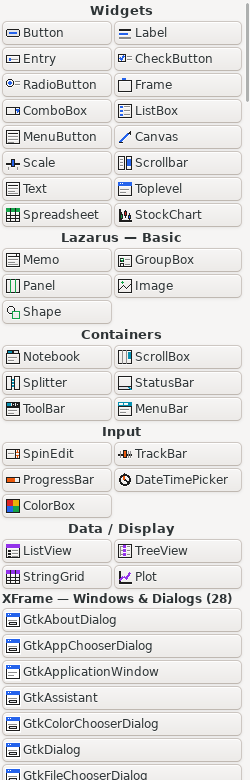
The widget palette is where the two projects visibly become one. The top holds the 36 FDesigner buttons — the original Tk set (Button, Label, Entry, CheckButton, RadioButton, ComboBox, ListBox, Frame, Scale, Text, StockChart, Spreadsheet, Toplevel, Canvas, Scrollbar, MenuButton) plus 20 Lazarus-style widgets (Memo, GroupBox, Panel, Image, Shape, Notebook, ScrollBox, Splitter, StatusBar, ToolBar, MenuBar, SpinEdit, TrackBar, ProgressBar, DateTimePicker, ColorBox, ListView, TreeView, StringGrid, Plot) — each with its own 16×16 icon, in a tight 2-column grid at Lazarus palette density.
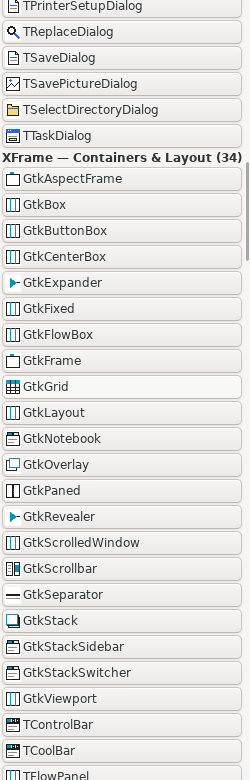
Scroll down and the XFrame sections begin: all 194 widgets in their 9 section groups, each entry showing its 16×16 icon and name. Click an FDesigner entry and the widget lands on the GTK canvas, ready to become generated C++ code. Click an XFrame entry and the choice is written to the shared selection file (/tmp/cwidgets-selection.txt) for the layout window, which places the real XFrame widget class — not a picture of it, not a placeholder. The standalone XFrame palette (cwidgets_palette) writes the same file, so either palette can drive the layout window.
The combined palette is covered by its own test: presence 36+194 exact, self-test 230/230, and a real-mouse place of GtkAboutDialog from the palette into the layout window.
The Layout Window
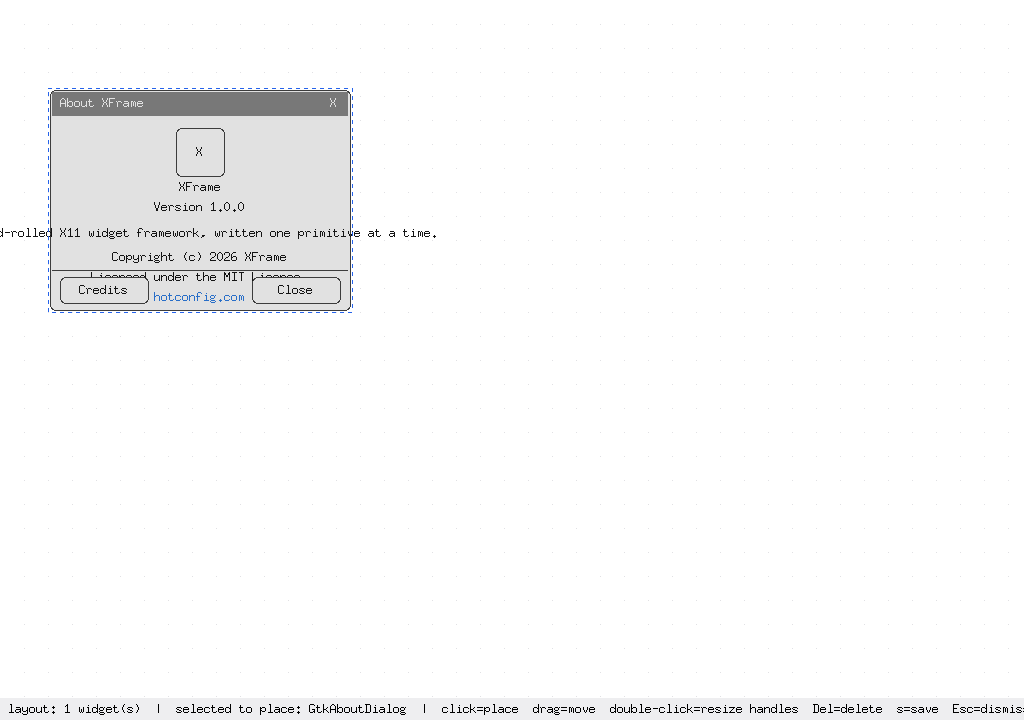
The layout window is the XFrame design surface. It instantiates the real XFrame widget classes through a type-erased factory: click empty canvas to place the widget selected in the palette, drag a placed widget to move it, Delete to remove it. Double-click a placed widget and 8 orange resize handles appear — corners and edges — drag one to resize live; Escape dismisses the handles. Press s to save the layout to /tmp/cwidgets-layout.txt, q to quit. The layout window re-reads the selection file every 100 ms, so picking in the palette updates the "selected to place" readout in its status bar.
Placement 194/194 PASS, draw 194/194 PASS — and all 194 widgets alive at once in the stress test, no crash. There is also a script mode for automated testing (cwidgets_layout --script cmds.txt --log out.log, with PLACE, PLACE_ALL, MOVE, RESIZE, DELETE, SELECT, DBLCLICK, HANDLE, CHECKDRAW, SAVE / LOAD, LIST, COUNT, QUIT).
The Code Inspector and the Debugger
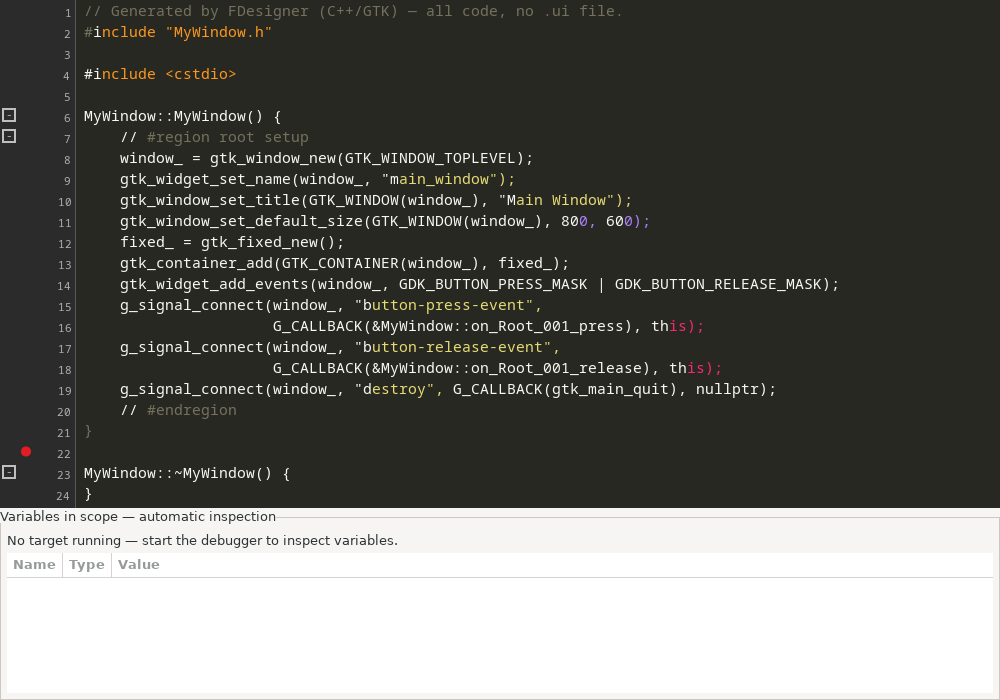
View → Code View shows the generated C++ for the current canvas in its own 1000×700 top-level window. Line numbers in the left gutter. Red-dot breakpoints — click anywhere in the gutter to toggle one, through the real debugger backend, persisted across runs. Folding for #region / #endregion, every brace-delimited block, multi-line comments, and #if blocks, nested in all directions. Four colour themes (Light, Dark, Monokai, Solarized Dark) and font settings in Edit → Preferences….
When the debugger pauses on a breakpoint, two things happen in the code window, both driven by the one shared GDB session (a 200 ms poll — no second gdb): the paused line's background goes solid red (#c00000) with white text, plus a white ▶ arrow in the gutter — the Lazarus execution-point style, distinct from the red-dot breakpoint marker — and the automatic variable inspection pane at the bottom shows the scope (func() — file:line) and the locals of the current frame, refreshed on every stop and step. While the target is running the pane says so and clears the paused line; it never presents stale values as current.
The debugger itself (Debug → Open Debugger…) drives a real gdb over the MI protocol. Run, Continue (F5), Step Over (F10), Step Into (F11), Step Out, Stop, Restart. Breakpoints come in three kinds — plain, conditional (stops only when a gdb expression is true), and logpoint (prints a message and never stops) — with ignore counts, log-message templates, and groups, all persisted. Locals, a watch list, and the stack refresh on every stop; target stdout/stderr appears in the bottom pane.
Code generation is all code, no .ui file, so the debugger can walk widget construction line by line: every widget is a standalone class in its own .h/.cpp pair, plus a CMakeLists.txt and a Makefile (executable app). File → Generate C++/GTK… writes the project; File → Build with CMake… builds it right there.
The Seam — And Its Honest Limits
The two halves are genuinely connected at one seam: widgets/tools/layout_to_fdesigner.py. Place widgets in the XFrame layout window, save the layout (s writes /tmp/cwidgets-layout.txt), and convert it:
python3 widgets/tools/layout_to_fdesigner.py /tmp/cwidgets-layout.txt /tmp/layout.fdj
Then open /tmp/layout.fdj in the designer (File → Open project) and use the normal flow: generate, build with CMake, debug with the stepping debugger.
Here is the honest accounting. 136 of the 194 XFrame widgets map to a real GTK counterpart — 35 of those are nearest-match approximations (for example GtkCalendar → DateTimePicker), listed by the converter. 58 — dialogs, choosers, menus, and other XFrame-only widgets — have no designer equivalent and are reported, never forced into a wrong type. And the seam is a converter, not a live bridge: the generated app re-creates the widgets as GTK widgets; it does not link XFrame classes, and layout edits do not flow back into the designer — you re-run the converter. That is a real limit, and it is stated here rather than glossed over: the layout window remains the place to work with real XFrame widgets, and the designer is where those layouts become GTK applications.
The seam is proved end to end by widgets/tests/test_layout_to_fdesigner.py (make test): convert → real .fdj load → real code generation (277 files for all 194) → CMake build of the generated project, with the generated app window appearing under X.
The Library in Brief
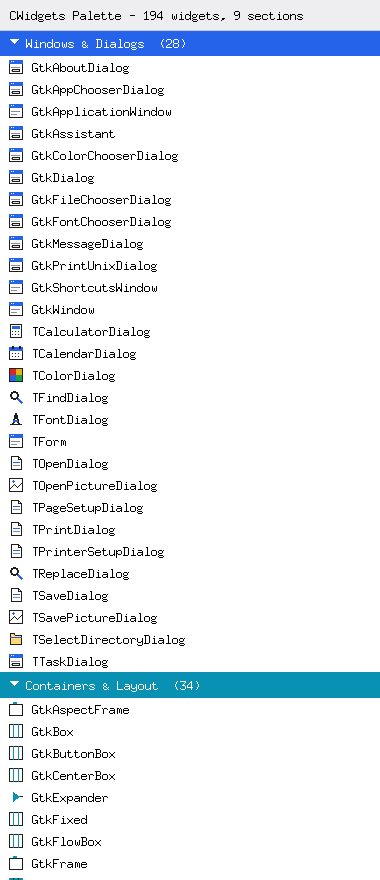
The full API reference for all 194 widgets — constructor, methods, signals, and a working example per widget — is already published here on the blog, one article per section, and in the repo at docs/. This article does not repeat it. The nine articles:
| Article | Section | Widgets |
|---|---|---|
| #11 Windows & Dialogs | Windows & Dialogs | 28 |
| #12 Containers & Layout | Containers & Layout | 34 |
| #13 Buttons | Buttons | 24 |
| #14 Display | Display | 33 |
| #15 Text & Entry | Text & Entry | 28 |
| #16 Choosers | Choosers | 10 |
| #17 Views & Lists | Views & Lists | 17 |
| #18 Menus & Toolbars | Menus & Toolbars | 16 |
| #19 Misc / X | Misc / X | 4 |
Every widget shares the same contract: one identical constructor, set_bounds / width / height / contains, visibility and enabled state, draw(), four event handlers (on_button_press, on_button_release, on_motion, on_key), and signals as public std::function members, most commonly on_click. The designer half is covered in its own article too: #10 — FDesigner.
Build It and Launch It
Prerequisites: a C++17 compiler (g++), CMake ≥ 3.20, X11 dev headers (libx11-dev), GTK 3 dev files (libgtk-3-dev), and gdb. Everything needs an X display — a real X server or Xvfb.
git clone https://github.com/cnmcdee/CWidgets.git
cd CWidgets
make # designer + widgets (194 demos + palette + layout)
./ide # the IDE: five top-level windows
# ./ide --build forces a rebuild
# ./ide --no-xframe designer alone
Per-half builds still work on their own: cd designer && make builds ./fdesigner (zero warnings); cd widgets && cmake -S . -B build && cmake --build build builds all 194 demos plus the palette and layout tools. A single XFrame component builds standalone — copy its directory out and run CMake in it; each ships its own copy of the shared core.
The Test Battery
Everything below was run on the VPS (Debian 12, g++ 12.2, Xvfb) against the combined tree. The per-half suites still apply unchanged in the combined repo.
| Suite | Result |
|---|---|
make clean && make (top-level, -Wall -Wextra) | BUILD OK, 0 warnings |
| Designer self-test (29 items) | 29/29 PASS |
| Debugger | console 37/37, GTK 7/7 |
| Generated-code matrix | 21/21 |
| Combined palette | 230/230 self-test + real-mouse place of GtkAboutDialog |
| XFrame palette / layout | placement 194/194, draw 194/194, all 194 alive at once |
| Seam (layout → .fdj → codegen → CMake) | ALL PASS — 136 mapped, 58 unmapped, generated app window appears under X |
| Widget tests / font / theme | 5/5, 20/20, 59/59 |
| Event handlers | 6/6 + runtime 41/41 |
| CMake | probe 31/31, script 4/4 |
| Code-window suite / palette-window tests / palette icons | ALL PASS / 16/16 / 13/13 |
Two honest caveats carried over from the halves. The chart-pro-render resize check in the matrix is timing-sensitive under bare Xvfb and has flaked before (proven a non-regression: inputs byte-identical to the base tree, which fails the same check). And under bare Xvfb the palette window has no title bar — expected, since there is no window manager; under a real one it shows FDesigner — Widgets.
Get It
The whole thing is one repository, MIT licensed (copyright 2026 cnmcdee): github.com/cnmcdee/CWidgets, HEAD 4151975. Layout: designer/ (FDesigner, round-3 tree), widgets/ (the XFrame library, palette, layout, icons, tools), docs/ (the IDE guide ide.md plus the full 194-widget reference), screenshots/, top-level Makefile and the single ./ide launcher.
One Repo, One Launcher, Two Toolkits That Finally Agree
This is the last article of the series: article #10 introduced the designer, #11–19 documented all 194 widgets one group at a time, and this one puts the whole thing together. A GTK designer that generates real code, a hand-drawn X11 widget library with a palette of 230 entries, a layout window that places real widget classes, and a GDB debugger that pauses on a red line and shows you the variables in scope — all behind ./ide.
The seam is one-way and the article said so. The 58 unmapped widgets are reported, not forced. The tests are the tests. Everything else is in the repo — go build something with it.