
YOUR DATA DESERVES A REAL VIEW?! XFrame Views & Lists — 17 Hand-Drawn Lists, Trees & Grids!
17 views and lists — list boxes, tree views, grids, icon views — hand-drawn X11 widgets for showing data. Full API, signals, and a compiling example for every widget in the group.
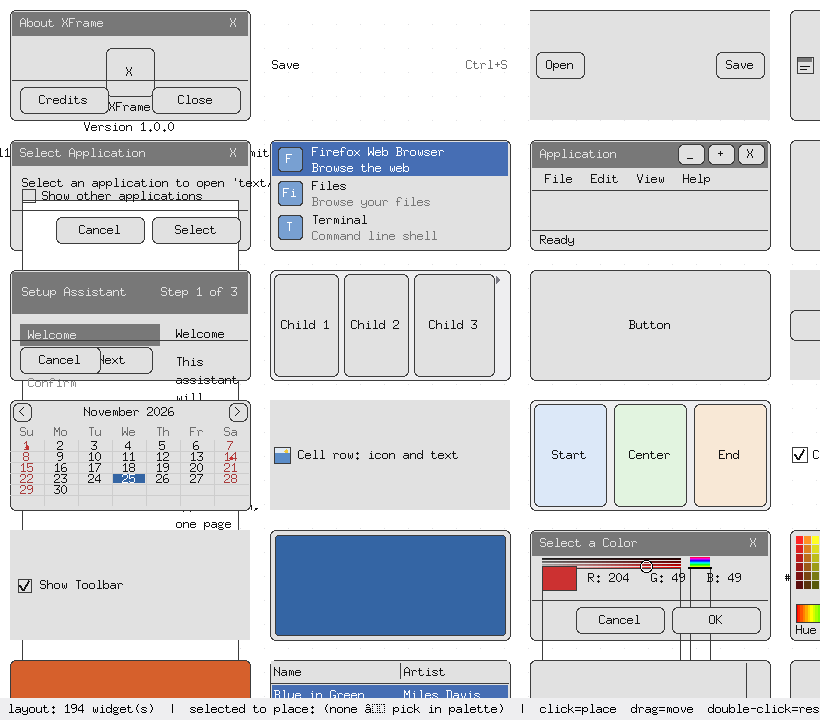
Every program eventually has to SHOW the user their data — and a bare dump of rows is not a view. You need columns that sort when you click the header, trees that fold and unfold, grids you can paint cell by cell, lists that scroll, check boxes on every row, and a file browser that actually walks the real filesystem. XFrame has all of it. XFrame is a pure X11/Xlib hand-drawn C++17 widget library — NOT GTK, despite the Gtk* names, no Qt, no toolkit at all — and every view in this group is drawn pixel by pixel with raw Xlib calls: the sort arrow in the column header, the expand/collapse markers on the tree nodes, the blue highlight on the selected row. No list widget from a desktop environment is involved. There is nothing to link against except libX11.
This is article 17 of a 9-part series documenting all 194 widgets in the library, one group at a time — every widget below with its full API, its signals, and a working example you can compile and run. This group, Views & Lists, holds 17 widgets: multi-column tables and sortable column views, icon and tile grids, single- and multi-select list boxes, two tree views, an owner-draw grid, a header control, check and radio groups, two shell browsers that read the real filesystem, and an editable string grid. The docs carry their honest caveats — where the public API only builds two-level trees, where there is no per-item deselect — because a reference that hides its limits is worse than no reference at all.
The code lives at github.com/cnmcdee/CWidgets — MIT licensed, all 194 demos building with zero warnings and zero crashes under Xvfb. Before the widget reference below, the shared contract every one of the 194 widgets obeys: the same constructor, the same geometry, visibility, style and event handlers, the same public std::function signals. Read it once and you can drive any widget in the library.
CWidgets Documentation
XFrame — a pure X11/Xlib hand-drawn C++17 widget library. Every widget is drawn by hand with raw Xlib calls. There is no GTK here, no Qt, no toolkit at all — despite the Gtk* names. The Gtk* components recreate the look of GTK widgets as standalone X11 classes; the T* components are the same idea in Lazarus/Delphi style; plus XGraph and XSpreadsheet.
Start with the project README for the repo layout, build instructions, and test status. This index documents the widget API itself: the contract every widget shares, then one page per section with every widget in it.
Contents
| Section | Widgets | Page |
|---|---|---|
| Windows & Dialogs | 28 | windows-dialogs.md |
| Containers & Layout | 34 | containers-layout.md |
| Buttons | 24 | buttons.md |
| Display | 33 | display.md |
| Text & Entry | 28 | text-entry.md |
| Choosers | 10 | choosers.md |
| Views & Lists | 17 | views-lists.md |
| Menus & Toolbars | 16 | menus-toolbars.md |
| Misc / X | 4 | misc-x.md |
| Total | 194 |
Section assignment is defined in tools/sections.py and verified by tools/sections.py itself (run it: python3 tools/sections.py) — every widget belongs to exactly one section.
The shared widget contract
This is the part that is the same for all 194 widgets (verified by inspection across all 194 headers: every member below exists in every header). Each section page therefore lists only what is specific to each widget — constructor, widget-specific methods, signals — and does not repeat this contract.
Construction
Every widget has the identical constructor:
<Name>(Display* display, int screen, Window window, GC gc,
       SStyle_Manager* styles, int x, int y, int width, int height)
display,screen,window,gc— the X connection and the window the widget draws into, fromXOpenDisplay/XCreateSimpleWindow/DefaultGC.styles— anSStyle_Manager(fromcore/xframe_core.h) holding the named styles. Register at least a"default"style withadd_style_ex(...)and activate it withset_active_style_byName(...)before constructing widgets.x, y, width, height— the widget's initial bounds in window coordinates.
Geometry
void set_bounds(int x, int y, int width, int height);
int  width();    // x2_ - x1_
int  height();   // y2_ - y1_
bool contains(int x, int y);  // false when not visible
Visibility and enabled state
void set_visible(bool v);
bool get_visible();
void set_enabled(bool e);
bool get_enabled();
A disabled widget still draws, but greyed out (text colour forced to grey) and its event handlers refuse input. An invisible widget does not draw and contains() returns false for it.
Style
void   set_style_name(std::string s);  // "" = the manager's active style
SStyle style();                        // styles_->resolve(style_name_)
Drawing
void draw();
Draws the widget into its window with the resolved style. Returns immediately when the widget is not visible. Call it after construction and again after any handled event (the standard demo loop clears the window and redraws on every handled event).
Events
Every widget implements the same four handlers. Each returns true when it handled the event (the demo loop then clears and redraws) and false otherwise:
bool on_button_press(int x, int y, unsigned int button);   // button 1 = left
bool on_button_release(int x, int y, unsigned int button);
bool on_motion(int x, int y);
bool on_key(KeySym key, const char* str);
Typical behaviour: on_button_press sets pressed_/focused_ when the click lands inside the widget; on_button_release fires the widget's callback if the release is still inside; on_key fires the callback on Return/Space when the widget has focus. on_motion is a no-op on most widgets — only a few headers carry hover state, and the test suite found only 12 of 194 demos show a visible hover response. Do not assume a widget reacts to hover unless its section page says so.
Signals
Widgets expose their callbacks as public std::function members, e.g.:
std::function<void()> on_click; // the most common signal (85 widgets)
Assign them like any member:
widget.on_click = [] { printf("clicked\n"); };
Signal names and signatures vary by widget — on_change, on_response, on_toggled, on_value_changed, on_selection_changed, on_color_changed, on_page_selected, ... — with payloads such as void(int), void(std::string), void(bool), void(double), void(Srgb), void(TTreeNode&). The exact name and signature for each widget are listed on its section page. Never guess a signal name: if it is not in the header, it does not exist.
Minimal program skeleton
Every demo in components/<Name>/main_<Name>.cpp follows this shape (shown here for GtkButton — the section pages trim it further per widget):
#include "GtkButton.h"
#include <cstdio>

int main() {
    Display* display = XOpenDisplay(nullptr);
    if (!display) return 1;
    int screen = DefaultScreen(display);
    Window window = XCreateSimpleWindow(display, RootWindow(display, screen),
        100, 100, 800, 600, 1,
        BlackPixel(display, screen), WhitePixel(display, screen));
    XStoreName(display, window, "GtkButton - XFrame demo");
    XSelectInput(display, window, ExposureMask | KeyPressMask |
        StructureNotifyMask | ButtonPressMask | ButtonReleaseMask |
        PointerMotionMask);
    Atom wmDelete = XInternAtom(display, "WM_DELETE_WINDOW", False);
    XSetWMProtocols(display, window, &wmDelete, 1);
    XMapWindow(display, window);

    GC gc = DefaultGC(display, screen);
    SStyle_Manager styles(display, window, screen, gc);
    styles.add_style_ex("default", Srgb{225, 225, 225}, Srgb{120, 120, 120},
        Srgb{60, 60, 60}, Srgb{20, 20, 20}, 6, 1,
        "-misc-fixed-medium-r-normal--13-*");
    styles.set_active_style_byName("default");

    GtkButton widget(display, screen, window, gc, &styles, 40, 40, 340, 200);
    widget.on_click = [] { printf("clicked\n"); };
    widget.draw();

    bool running = true;
    while (running) {
        XEvent event;
        XNextEvent(display, &event);
        bool handled = false;
        switch (event.type) {
        case Expose:        handled = true; break;
        case ButtonPress:   handled = widget.on_button_press(
                                event.xbutton.x, event.xbutton.y,
                                event.xbutton.button); break;
        case ButtonRelease: handled = widget.on_button_release(
                                event.xbutton.x, event.xbutton.y,
                                event.xbutton.button); break;
        case MotionNotify:  handled = widget.on_motion(
                                event.xmotion.x, event.xmotion.y); break;
        case KeyPress: {
            char buffer[32];
            KeySym key = 0;
            int n = XLookupString(&event.xkey, buffer, sizeof(buffer) - 1,
                                  &key, nullptr);
            buffer[n] = 0;
            handled = widget.on_key(key, buffer);
            break;
        }
        case ClientMessage:
            if ((Atom)event.xclient.data.l[0] == wmDelete) running = false;
            break;
        }
        if (handled) {
            XClearWindow(display, window);
            widget.draw();
            XFlush(display);
        }
    }
    XCloseDisplay(display);
    return 0;
}
Build a single example (from the repo root, with the header's component directory on the include path):
g++ -std=c++17 -I components/GtkButton example.cpp -lX11 -o example
Or build the shipped demo instead — components/<Name>/CMakeLists.txt builds it standalone, and the top-level build builds all 194 (see the README).
Tools
- Selector palette —
palette/buildscwidgets_palette(part of the top-level build). A pure X11/XFrame window listing all 194 widgets in their 9 sections, each with its 16x16 icon. Click (or Up/Down + Enter) to select; the selection is written to the shared selection file (/tmp/cwidgets-selection.txt) for the layout tool. Self-test: 194/194 selections OK. - Layout window —
layout/buildscwidgets_layout. Instantiates the real widget classes via the generated factory incommon/registry.h(generated bytools/gen_registry.py— do not edit by hand). Click to place the selected widget, drag to move, Delete to remove,sto save/load the layout,qto quit. Double-click a placed widget for 8 orange resize handles (corners + edges); drag a handle to resize live; Escape dismisses the handles, Delete removes the widget. - Icons —
icons/<Name>.ico, one real 16x16 ICO per widget, purpose-drawn glyphs generated bytools/gen_icons.py(70 glyph kinds, section accent colours — not downscaled screenshots). Verified bytools/verify_icons.py: 194/194 parse as 16x16, all non-blank.
Test status
Tested Nov 26, 2026 on the VPS (Debian 12, g++ 12.2, Xvfb) with the autonomous driver test-driver/run_tests.py: all 194 demos build with 0 warnings (-Wall -Wextra); 193 draw (GtkInvisible is non-visual by design); 125 show a visible click response (the rest are display-only by design); all 194 survive keypresses and exit cleanly; zero crashes, zero hangs. Full table: test-results/results.md. Palette self-test 194/194; layout placement 194/194, draw 194/194, all 194 alive at once (test-results/palette_layout_results.csv).
License
MIT — see LICENSE. Copyright (c) 2026 cnmcdee.
Views & Lists
Lists, grids, trees and tables: single- and multi-column views, icon and tile grids, trees with expandable nodes, and the file-system browsers. Selection is by row index (0-based) unless the widget says otherwise, and most of these fire a selection signal with the index that changed.
Every widget here shares the common XFrame widget API — same constructor, set_bounds/draw/event handlers, visible/enabled state. The shared contract is documented in docs/index.md (written by the coordinator). Each subsection below lists only what is specific to that widget.
GtkColumnView
A multi-column table with a header row. Columns are added with titles and widths, rows are vectors of cell strings; clicking a column header sorts by that column (calling sort_by on the same column again flips the direction), and the sort arrow is drawn in the header.
Constructor: GtkColumnView(Display* display, int screen, Window window, GC gc, SStyle_Manager* styles, int x, int y, int width, int height)
API (widget-specific methods/properties/signals ONLY — skip the common ones): - set_text(std::string t) / get_text() — the widget text - add_column(std::string title, int col_width) — appends a column - add_row(std::vector<std::string> cells) — appends a row (one string per column) - clear_rows() — removes all rows - row_count() — number of rows - get_selected_row() — selected row index, -1 for none - get_cell(int row, int col) — cell text ("" out of range) - get_sort_column() / get_sort_ascending() — which column is sorted, and in which direction - sort_by(int col) — sort by a column; calling it again on the same column reverses the direction - signal on_selection_changed (std::function<void()>) — fires when the selection changes
Example:
#include "GtkColumnView.h"
#include <cstdio>
#include <string>
#include <vector>

int main()
{
    Display* display = XOpenDisplay(nullptr);
    if (!display) { return 1; }
    int screen = DefaultScreen(display);
    XID Xid = RootWindow(display, screen);
    Window window = XCreateSimpleWindow(display, Xid, 100, 100, 800, 600, 1, BlackPixel(display, screen), WhitePixel(display, screen));
    XStoreName(display, window, "GtkColumnView - XFrame demo");
    XSelectInput(display, window, ExposureMask | KeyPressMask | StructureNotifyMask | ButtonPressMask | ButtonReleaseMask | PointerMotionMask);
    Atom deleteWindowMessage = XInternAtom(display, "WM_DELETE_WINDOW", False);
    XSetWMProtocols(display, window, &deleteWindowMessage, 1);
    XMapWindow(display, window);
    GC gc = DefaultGC(display, screen);
    SStyle_Manager styles(display, window, screen, gc);
    styles.add_style_ex("default", Srgb{225, 225, 225}, Srgb{120, 120, 120}, Srgb{60, 60, 60}, Srgb{20, 20, 20}, 6, 1, "-misc-fixed-medium-r-normal--13-*");
    styles.set_active_style_byName("default");
    GtkColumnView widget(display, screen, window, gc, &styles, 20, 20, 720, 480);
    widget.add_column("Name", 200);
    widget.add_column("Age", 80);
    widget.add_row(std::vector<std::string>{"Ada", "36"});
    widget.on_selection_changed = []{ std::printf("selection changed\n"); };
    widget.draw();
    bool running = true;
    while (running)
    {
        XEvent event;
        XNextEvent(display, &event);
        bool handled = false;
        switch (event.type)
        {
        case Expose:
            handled = true;
            break;
        case ButtonPress:
            handled = widget.on_button_press(event.xbutton.x, event.xbutton.y, event.xbutton.button);
            break;
        case ButtonRelease:
            handled = widget.on_button_release(event.xbutton.x, event.xbutton.y, event.xbutton.button);
            break;
        case MotionNotify:
            handled = widget.on_motion(event.xmotion.x, event.xmotion.y);
            break;
        case KeyPress:
        {
            char buffer[32];
            KeySym key = 0;
            int n = XLookupString(&event.xkey, buffer, (int)sizeof(buffer) - 1, &key, nullptr);
            buffer[n] = 0;
            handled = widget.on_key(key, buffer);
            break;
        }
        case ClientMessage:
            if ((Atom)event.xclient.data.l[0] == deleteWindowMessage)
            {
                running = false;
            }
            break;
        }
        if (handled)
        {
            XClearWindow(display, window);
            widget.draw();
            XFlush(display);
        }
    }
    XCloseDisplay(display);
    return 0;
}
Notes: Rows are compared as strings when sorting; the header click calls sort_by() for you.
GtkGridView
A grid of tiles. Each item is drawn as a tile with a blue icon placeholder and its label underneath; tiles flow left to right and wrap to the next row. The tile size is configurable, and the selected tile is drawn highlighted.
Constructor: GtkGridView(Display* display, int screen, Window window, GC gc, SStyle_Manager* styles, int x, int y, int width, int height)
API (widget-specific methods/properties/signals ONLY — skip the common ones): - set_text(std::string t) / get_text() — the widget text - add_item(std::string item) — appends a tile - clear_items() — removes all tiles - item_count() — number of tiles - set_tile_size(int w, int h) — tile width / height in pixels - get_selected() — selected tile index, -1 for none - get_selected_text() — label of the selected tile, "" when there is none - select(int index) — select a tile - signal on_selection_changed (std::function<void()>) — fires when the selection changes
Example:
#include "GtkGridView.h"
#include <cstdio>
#include <string>
#include <vector>

int main()
{
    Display* display = XOpenDisplay(nullptr);
    if (!display) { return 1; }
    int screen = DefaultScreen(display);
    XID Xid = RootWindow(display, screen);
    Window window = XCreateSimpleWindow(display, Xid, 100, 100, 800, 600, 1, BlackPixel(display, screen), WhitePixel(display, screen));
    XStoreName(display, window, "GtkGridView - XFrame demo");
    XSelectInput(display, window, ExposureMask | KeyPressMask | StructureNotifyMask | ButtonPressMask | ButtonReleaseMask | PointerMotionMask);
    Atom deleteWindowMessage = XInternAtom(display, "WM_DELETE_WINDOW", False);
    XSetWMProtocols(display, window, &deleteWindowMessage, 1);
    XMapWindow(display, window);
    GC gc = DefaultGC(display, screen);
    SStyle_Manager styles(display, window, screen, gc);
    styles.add_style_ex("default", Srgb{225, 225, 225}, Srgb{120, 120, 120}, Srgb{60, 60, 60}, Srgb{20, 20, 20}, 6, 1, "-misc-fixed-medium-r-normal--13-*");
    styles.set_active_style_byName("default");
    GtkGridView widget(display, screen, window, gc, &styles, 40, 40, 340, 200);
    widget.add_item("One");
    widget.add_item("Two");
    widget.add_item("Three");
    widget.add_item("Four");
    widget.set_tile_size(100, 80);
    widget.select(1);
    widget.on_selection_changed = []{ std::printf("selection changed\n"); };
    widget.draw();
    bool running = true;
    while (running)
    {
        XEvent event;
        XNextEvent(display, &event);
        bool handled = false;
        switch (event.type)
        {
        case Expose:
            handled = true;
            break;
        case ButtonPress:
            handled = widget.on_button_press(event.xbutton.x, event.xbutton.y, event.xbutton.button);
            break;
        case ButtonRelease:
            handled = widget.on_button_release(event.xbutton.x, event.xbutton.y, event.xbutton.button);
            break;
        case MotionNotify:
            handled = widget.on_motion(event.xmotion.x, event.xmotion.y);
            break;
        case KeyPress:
        {
            char buffer[32];
            KeySym key = 0;
            int n = XLookupString(&event.xkey, buffer, (int)sizeof(buffer) - 1, &key, nullptr);
            buffer[n] = 0;
            handled = widget.on_key(key, buffer);
            break;
        }
        case ClientMessage:
            if ((Atom)event.xclient.data.l[0] == deleteWindowMessage)
            {
                running = false;
            }
            break;
        }
        if (handled)
        {
            XClearWindow(display, window);
            widget.draw();
            XFlush(display);
        }
    }
    XCloseDisplay(display);
    return 0;
}
Notes: The icon in each tile is a drawn placeholder rectangle, not a loaded image.
GtkIconView
A grid of icons with labels, like GtkGridView, but with multiple selection: each item has its own selected flag. Clicking an already-selected item activates it.
Constructor: GtkIconView(Display* display, int screen, Window window, GC gc, SStyle_Manager* styles, int x, int y, int width, int height)
API (widget-specific methods/properties/signals ONLY — skip the common ones): - set_text(std::string t) / get_text() — the widget text - add_item(std::string item) — appends an icon - clear_items() — removes all icons - item_count() — number of icons - get_selected_items() — indexes of all selected icons - get_selected_text() — label of the first selected icon, "" when none is selected - select_item(int index) — select one icon (other selections are kept) - signal on_selection_changed (std::function<void()>) — fires when the selection changes - signal on_item_activated (std::function<void()>) — fires when an already-selected item is clicked again
Example:
#include "GtkIconView.h"
#include <cstdio>
#include <string>
#include <vector>

int main()
{
    Display* display = XOpenDisplay(nullptr);
    if (!display) { return 1; }
    int screen = DefaultScreen(display);
    XID Xid = RootWindow(display, screen);
    Window window = XCreateSimpleWindow(display, Xid, 100, 100, 800, 600, 1, BlackPixel(display, screen), WhitePixel(display, screen));
    XStoreName(display, window, "GtkIconView - XFrame demo");
    XSelectInput(display, window, ExposureMask | KeyPressMask | StructureNotifyMask | ButtonPressMask | ButtonReleaseMask | PointerMotionMask);
    Atom deleteWindowMessage = XInternAtom(display, "WM_DELETE_WINDOW", False);
    XSetWMProtocols(display, window, &deleteWindowMessage, 1);
    XMapWindow(display, window);
    GC gc = DefaultGC(display, screen);
    SStyle_Manager styles(display, window, screen, gc);
    styles.add_style_ex("default", Srgb{225, 225, 225}, Srgb{120, 120, 120}, Srgb{60, 60, 60}, Srgb{20, 20, 20}, 6, 1, "-misc-fixed-medium-r-normal--13-*");
    styles.set_active_style_byName("default");
    GtkIconView widget(display, screen, window, gc, &styles, 40, 40, 340, 200);
    widget.add_item("One");
    widget.add_item("Two");
    widget.add_item("Three");
    widget.select_item(0);
    widget.on_selection_changed = []{ std::printf("selection changed\n"); };
    widget.on_item_activated = []{ std::printf("activated\n"); };
    widget.draw();
    bool running = true;
    while (running)
    {
        XEvent event;
        XNextEvent(display, &event);
        bool handled = false;
        switch (event.type)
        {
        case Expose:
            handled = true;
            break;
        case ButtonPress:
            handled = widget.on_button_press(event.xbutton.x, event.xbutton.y, event.xbutton.button);
            break;
        case ButtonRelease:
            handled = widget.on_button_release(event.xbutton.x, event.xbutton.y, event.xbutton.button);
            break;
        case MotionNotify:
            handled = widget.on_motion(event.xmotion.x, event.xmotion.y);
            break;
        case KeyPress:
        {
            char buffer[32];
            KeySym key = 0;
            int n = XLookupString(&event.xkey, buffer, (int)sizeof(buffer) - 1, &key, nullptr);
            buffer[n] = 0;
            handled = widget.on_key(key, buffer);
            break;
        }
        case ClientMessage:
            if ((Atom)event.xclient.data.l[0] == deleteWindowMessage)
            {
                running = false;
            }
            break;
        }
        if (handled)
        {
            XClearWindow(display, window);
            widget.draw();
            XFlush(display);
        }
    }
    XCloseDisplay(display);
    return 0;
}
Notes: The icons are drawn placeholders, as in GtkGridView; there is no per-item deselect method — clear_items() resets everything.
GtkListBox
A vertical list of rows in a white box with an outline. Rows are plain strings; the selected row is drawn highlighted, the list scrolls when there are more rows than fit, and row_rect() reports where a visible row is drawn.
Constructor: GtkListBox(Display* display, int screen, Window window, GC gc, SStyle_Manager* styles, int x, int y, int width, int height)
API (widget-specific methods/properties/signals ONLY — skip the common ones): - set_text(std::string t) / get_text() — the widget text - visible_row_count() — how many rows fit in the current height - row_rect(int v, int& rx1, int& ry1, int& rx2, int& ry2) — rectangle of visible row v (0-based from the top of the view) - add_row(std::string label) — appends a row - remove_row(int i) — removes a row - row_count() — number of rows - get_selected_row() / set_selected_row(int i) — selected row index, -1 for none - get_row(int i) — label of one row - signal on_row_selected (std::function<void(int)>) — fires with the selected row index
Example:
#include "GtkListBox.h"
#include <cstdio>
#include <string>
#include <vector>

int main()
{
    Display* display = XOpenDisplay(nullptr);
    if (!display) { return 1; }
    int screen = DefaultScreen(display);
    XID Xid = RootWindow(display, screen);
    Window window = XCreateSimpleWindow(display, Xid, 100, 100, 800, 600, 1, BlackPixel(display, screen), WhitePixel(display, screen));
    XStoreName(display, window, "GtkListBox - XFrame demo");
    XSelectInput(display, window, ExposureMask | KeyPressMask | StructureNotifyMask | ButtonPressMask | ButtonReleaseMask | PointerMotionMask);
    Atom deleteWindowMessage = XInternAtom(display, "WM_DELETE_WINDOW", False);
    XSetWMProtocols(display, window, &deleteWindowMessage, 1);
    XMapWindow(display, window);
    GC gc = DefaultGC(display, screen);
    SStyle_Manager styles(display, window, screen, gc);
    styles.add_style_ex("default", Srgb{225, 225, 225}, Srgb{120, 120, 120}, Srgb{60, 60, 60}, Srgb{20, 20, 20}, 6, 1, "-misc-fixed-medium-r-normal--13-*");
    styles.set_active_style_byName("default");
    GtkListBox widget(display, screen, window, gc, &styles, 40, 40, 340, 200);
    widget.add_row("Alpha");
    widget.add_row("Beta");
    widget.add_row("Gamma");
    widget.set_selected_row(1);
    widget.on_row_selected = [](int r){ std::printf("row %d\n", r); };
    widget.draw();
    bool running = true;
    while (running)
    {
        XEvent event;
        XNextEvent(display, &event);
        bool handled = false;
        switch (event.type)
        {
        case Expose:
            handled = true;
            break;
        case ButtonPress:
            handled = widget.on_button_press(event.xbutton.x, event.xbutton.y, event.xbutton.button);
            break;
        case ButtonRelease:
            handled = widget.on_button_release(event.xbutton.x, event.xbutton.y, event.xbutton.button);
            break;
        case MotionNotify:
            handled = widget.on_motion(event.xmotion.x, event.xmotion.y);
            break;
        case KeyPress:
        {
            char buffer[32];
            KeySym key = 0;
            int n = XLookupString(&event.xkey, buffer, (int)sizeof(buffer) - 1, &key, nullptr);
            buffer[n] = 0;
            handled = widget.on_key(key, buffer);
            break;
        }
        case ClientMessage:
            if ((Atom)event.xclient.data.l[0] == deleteWindowMessage)
            {
                running = false;
            }
            break;
        }
        if (handled)
        {
            XClearWindow(display, window);
            widget.draw();
            XFlush(display);
        }
    }
    XCloseDisplay(display);
    return 0;
}
Notes: None.
GtkListView
A vertical list of items with multiple selection. Selected rows are drawn in blue, the last-clicked row is banded, and the view scrolls by rows; get_selected_rows() returns every selected row.
Constructor: GtkListView(Display* display, int screen, Window window, GC gc, SStyle_Manager* styles, int x, int y, int width, int height)
API (widget-specific methods/properties/signals ONLY — skip the common ones): - set_text(std::string t) / get_text() — the widget text - add_item(std::string item) — appends an item - clear_items() — removes all items - item_count() — number of items - get_item(int index) — text of one item - select_row(int index) — select a row - get_selected_rows() — indexes of all selected rows - get_selected_row() — first selected row, -1 for none - set_scroll_row(int row) — scroll so this row is at the top - signal on_selection_changed (std::function<void()>) — fires when the selection changes
Example:
#include "GtkListView.h"
#include <cstdio>
#include <string>
#include <vector>

int main()
{
    Display* display = XOpenDisplay(nullptr);
    if (!display) { return 1; }
    int screen = DefaultScreen(display);
    XID Xid = RootWindow(display, screen);
    Window window = XCreateSimpleWindow(display, Xid, 100, 100, 800, 600, 1, BlackPixel(display, screen), WhitePixel(display, screen));
    XStoreName(display, window, "GtkListView - XFrame demo");
    XSelectInput(display, window, ExposureMask | KeyPressMask | StructureNotifyMask | ButtonPressMask | ButtonReleaseMask | PointerMotionMask);
    Atom deleteWindowMessage = XInternAtom(display, "WM_DELETE_WINDOW", False);
    XSetWMProtocols(display, window, &deleteWindowMessage, 1);
    XMapWindow(display, window);
    GC gc = DefaultGC(display, screen);
    SStyle_Manager styles(display, window, screen, gc);
    styles.add_style_ex("default", Srgb{225, 225, 225}, Srgb{120, 120, 120}, Srgb{60, 60, 60}, Srgb{20, 20, 20}, 6, 1, "-misc-fixed-medium-r-normal--13-*");
    styles.set_active_style_byName("default");
    GtkListView widget(display, screen, window, gc, &styles, 40, 40, 340, 200);
    widget.add_item("One");
    widget.add_item("Two");
    widget.add_item("Three");
    widget.select_row(1);
    widget.on_selection_changed = []{ std::printf("selection changed\n"); };
    widget.draw();
    bool running = true;
    while (running)
    {
        XEvent event;
        XNextEvent(display, &event);
        bool handled = false;
        switch (event.type)
        {
        case Expose:
            handled = true;
            break;
        case ButtonPress:
            handled = widget.on_button_press(event.xbutton.x, event.xbutton.y, event.xbutton.button);
            break;
        case ButtonRelease:
            handled = widget.on_button_release(event.xbutton.x, event.xbutton.y, event.xbutton.button);
            break;
        case MotionNotify:
            handled = widget.on_motion(event.xmotion.x, event.xmotion.y);
            break;
        case KeyPress:
        {
            char buffer[32];
            KeySym key = 0;
            int n = XLookupString(&event.xkey, buffer, (int)sizeof(buffer) - 1, &key, nullptr);
            buffer[n] = 0;
            handled = widget.on_key(key, buffer);
            break;
        }
        case ClientMessage:
            if ((Atom)event.xclient.data.l[0] == deleteWindowMessage)
            {
                running = false;
            }
            break;
        }
        if (handled)
        {
            XClearWindow(display, window);
            widget.draw();
            XFlush(display);
        }
    }
    XCloseDisplay(display);
    return 0;
}
Notes: None.
GtkTreeView
A tree with columns. Roots are added with a vector of cell strings, children are added under a root by index; nodes can be expanded or collapsed, and the flattened visible rows are what get_selected_row() counts. The node type is a public struct.
Constructor: GtkTreeView(Display* display, int screen, Window window, GC gc, SStyle_Manager* styles, int x, int y, int width, int height)
API (widget-specific methods/properties/signals ONLY — skip the common ones): - set_text(std::string t) / get_text() — the widget text - add_column(std::string title, int col_width) — appends a column - column_count() — number of columns - append_root(std::vector<std::string> cells) — adds a top-level node - append_child(int root_index, std::vector<std::string> cells) — adds a child under a root - Node make_node(std::vector<std::string> cells) — build a node value from a cell vector (used by the constructor for its sample tree) - clear() — removes all nodes - expand_all() / collapse_all() — expand / collapse every node - set_expanded_rec(std::vector<Node>& nodes, bool expanded) — recursively set the expanded flag on a list of nodes (the public Node struct holds cells, children and expanded, default true) - get_selected_row() — selected visible row, -1 for none - get_selected_text() — text of the selected row (first column) - set_scroll_row(int row) / get_scroll_row() — scroll position in visible rows - signal on_selection_changed (std::function<void()>) — fires when the selection changes
Example:
#include "GtkTreeView.h"
#include <cstdio>
#include <string>
#include <vector>

int main()
{
    Display* display = XOpenDisplay(nullptr);
    if (!display) { return 1; }
    int screen = DefaultScreen(display);
    XID Xid = RootWindow(display, screen);
    Window window = XCreateSimpleWindow(display, Xid, 100, 100, 800, 600, 1, BlackPixel(display, screen), WhitePixel(display, screen));
    XStoreName(display, window, "GtkTreeView - XFrame demo");
    XSelectInput(display, window, ExposureMask | KeyPressMask | StructureNotifyMask | ButtonPressMask | ButtonReleaseMask | PointerMotionMask);
    Atom deleteWindowMessage = XInternAtom(display, "WM_DELETE_WINDOW", False);
    XSetWMProtocols(display, window, &deleteWindowMessage, 1);
    XMapWindow(display, window);
    GC gc = DefaultGC(display, screen);
    SStyle_Manager styles(display, window, screen, gc);
    styles.add_style_ex("default", Srgb{225, 225, 225}, Srgb{120, 120, 120}, Srgb{60, 60, 60}, Srgb{20, 20, 20}, 6, 1, "-misc-fixed-medium-r-normal--13-*");
    styles.set_active_style_byName("default");
    GtkTreeView widget(display, screen, window, gc, &styles, 20, 20, 720, 480);
    widget.add_column("Name", 200);
    widget.add_column("Size", 100);
    widget.append_root(std::vector<std::string>{"src"});
    widget.append_child(0, std::vector<std::string>{"main.cpp"});
    widget.on_selection_changed = []{ std::printf("selection changed\n"); };
    widget.draw();
    bool running = true;
    while (running)
    {
        XEvent event;
        XNextEvent(display, &event);
        bool handled = false;
        switch (event.type)
        {
        case Expose:
            handled = true;
            break;
        case ButtonPress:
            handled = widget.on_button_press(event.xbutton.x, event.xbutton.y, event.xbutton.button);
            break;
        case ButtonRelease:
            handled = widget.on_button_release(event.xbutton.x, event.xbutton.y, event.xbutton.button);
            break;
        case MotionNotify:
            handled = widget.on_motion(event.xmotion.x, event.xmotion.y);
            break;
        case KeyPress:
        {
            char buffer[32];
            KeySym key = 0;
            int n = XLookupString(&event.xkey, buffer, (int)sizeof(buffer) - 1, &key, nullptr);
            buffer[n] = 0;
            handled = widget.on_key(key, buffer);
            break;
        }
        case ClientMessage:
            if ((Atom)event.xclient.data.l[0] == deleteWindowMessage)
            {
                running = false;
            }
            break;
        }
        if (handled)
        {
            XClearWindow(display, window);
            widget.draw();
            XFlush(display);
        }
    }
    XCloseDisplay(display);
    return 0;
}
Notes: append_child only adds children under roots, so the public API builds two-level trees; the constructor itself builds its sample tree with make_node() plus direct children.push_back() on local Node values, but there is no public method to insert such a node — the root list is private. The constructor pre-fills a sample tree: Documents (report.odt, budget.ods), Pictures (holiday.png, cat.jpg), Music (song.flac) and notes.txt.
TCheckGroup
A group box with a caption and a grid of check boxes. Items are added with an optional initial checked state; the box lays them out in columns, each with a 15 px check box and a caption, and reports how many are checked.
Constructor: TCheckGroup(Display* display, int screen, Window window, GC gc, SStyle_Manager* styles, int x, int y, int width, int height)
API (widget-specific methods/properties/signals ONLY — skip the common ones): - set_text(std::string t) / get_text() — the group caption drawn in the box outline - add_item(std::string caption, bool checked = false) — appends a check box - clear_items() — removes all items - item_count() — number of items - get_item(int index) / set_item(int index, std::string caption) — caption of one item - get_checked(int index) / set_checked(int index, bool value) — checked state of one item - checked_count() — how many items are checked - set_columns(int c) / get_columns() — columns in the layout - set_item_height(int h) / get_item_height() — row height in pixels - index_at(int x, int y) — item index under a point, -1 when there is none - item_bounds(int index, int& rx, int& ry, int& rw, int& rh) — rectangle of one item; false when the index is out of range - signal on_item_change (std::function<void(int)>) — fires with the index whose check box changed
Example:
#include "TCheckGroup.h"
#include <cstdio>
#include <string>
#include <vector>

int main()
{
    Display* display = XOpenDisplay(nullptr);
    if (!display) { return 1; }
    int screen = DefaultScreen(display);
    XID Xid = RootWindow(display, screen);
    Window window = XCreateSimpleWindow(display, Xid, 100, 100, 800, 600, 1, BlackPixel(display, screen), WhitePixel(display, screen));
    XStoreName(display, window, "TCheckGroup - XFrame demo");
    XSelectInput(display, window, ExposureMask | KeyPressMask | StructureNotifyMask | ButtonPressMask | ButtonReleaseMask | PointerMotionMask);
    Atom deleteWindowMessage = XInternAtom(display, "WM_DELETE_WINDOW", False);
    XSetWMProtocols(display, window, &deleteWindowMessage, 1);
    XMapWindow(display, window);
    GC gc = DefaultGC(display, screen);
    SStyle_Manager styles(display, window, screen, gc);
    styles.add_style_ex("default", Srgb{225, 225, 225}, Srgb{120, 120, 120}, Srgb{60, 60, 60}, Srgb{20, 20, 20}, 6, 1, "-misc-fixed-medium-r-normal--13-*");
    styles.set_active_style_byName("default");
    TCheckGroup widget(display, screen, window, gc, &styles, 40, 40, 340, 200);
    widget.add_item("Bold", true);
    widget.add_item("Italic");
    widget.add_item("Underline");
    widget.set_columns(2);
    widget.on_item_change = [](int i){ std::printf("item %d\n", i); };
    widget.draw();
    bool running = true;
    while (running)
    {
        XEvent event;
        XNextEvent(display, &event);
        bool handled = false;
        switch (event.type)
        {
        case Expose:
            handled = true;
            break;
        case ButtonPress:
            handled = widget.on_button_press(event.xbutton.x, event.xbutton.y, event.xbutton.button);
            break;
        case ButtonRelease:
            handled = widget.on_button_release(event.xbutton.x, event.xbutton.y, event.xbutton.button);
            break;
        case MotionNotify:
            handled = widget.on_motion(event.xmotion.x, event.xmotion.y);
            break;
        case KeyPress:
        {
            char buffer[32];
            KeySym key = 0;
            int n = XLookupString(&event.xkey, buffer, (int)sizeof(buffer) - 1, &key, nullptr);
            buffer[n] = 0;
            handled = widget.on_key(key, buffer);
            break;
        }
        case ClientMessage:
            if ((Atom)event.xclient.data.l[0] == deleteWindowMessage)
            {
                running = false;
            }
            break;
        }
        if (handled)
        {
            XClearWindow(display, window);
            widget.draw();
            XFlush(display);
        }
    }
    XCloseDisplay(display);
    return 0;
}
Notes: None.
TCheckListBox
A list box with a check box on every row. Clicking the row selects it; clicking the box toggles it and fires on_click_check. The list scrolls by rows.
Constructor: TCheckListBox(Display* display, int screen, Window window, GC gc, SStyle_Manager* styles, int x, int y, int width, int height)
API (widget-specific methods/properties/signals ONLY — skip the common ones): - set_text(std::string t) / get_text() — the widget text - add_item(std::string text, bool checked = false) — appends a row - set_checked(int i, bool v) / get_checked(int i) — check state of one row - get_item_index() / set_item_index(int i) — selected row index - item_count() — number of rows - get_item(int i) — text of one row - clear_items() — removes all rows - get_top_index() — first visible row (the scroll position, read-only) - signal on_click (std::function<void()>) — fires on a click in the list - signal on_click_check (std::function<void(int)>) — fires with the row whose check box was toggled
Example:
#include "TCheckListBox.h"
#include <cstdio>
#include <string>
#include <vector>

int main()
{
    Display* display = XOpenDisplay(nullptr);
    if (!display) { return 1; }
    int screen = DefaultScreen(display);
    XID Xid = RootWindow(display, screen);
    Window window = XCreateSimpleWindow(display, Xid, 100, 100, 800, 600, 1, BlackPixel(display, screen), WhitePixel(display, screen));
    XStoreName(display, window, "TCheckListBox - XFrame demo");
    XSelectInput(display, window, ExposureMask | KeyPressMask | StructureNotifyMask | ButtonPressMask | ButtonReleaseMask | PointerMotionMask);
    Atom deleteWindowMessage = XInternAtom(display, "WM_DELETE_WINDOW", False);
    XSetWMProtocols(display, window, &deleteWindowMessage, 1);
    XMapWindow(display, window);
    GC gc = DefaultGC(display, screen);
    SStyle_Manager styles(display, window, screen, gc);
    styles.add_style_ex("default", Srgb{225, 225, 225}, Srgb{120, 120, 120}, Srgb{60, 60, 60}, Srgb{20, 20, 20}, 6, 1, "-misc-fixed-medium-r-normal--13-*");
    styles.set_active_style_byName("default");
    TCheckListBox widget(display, screen, window, gc, &styles, 40, 40, 340, 200);
    widget.add_item("One", true);
    widget.add_item("Two");
    widget.add_item("Three");
    widget.set_item_index(0);
    widget.on_click_check = [](int i){ std::printf("check %d\n", i); };
    widget.draw();
    bool running = true;
    while (running)
    {
        XEvent event;
        XNextEvent(display, &event);
        bool handled = false;
        switch (event.type)
        {
        case Expose:
            handled = true;
            break;
        case ButtonPress:
            handled = widget.on_button_press(event.xbutton.x, event.xbutton.y, event.xbutton.button);
            break;
        case ButtonRelease:
            handled = widget.on_button_release(event.xbutton.x, event.xbutton.y, event.xbutton.button);
            break;
        case MotionNotify:
            handled = widget.on_motion(event.xmotion.x, event.xmotion.y);
            break;
        case KeyPress:
        {
            char buffer[32];
            KeySym key = 0;
            int n = XLookupString(&event.xkey, buffer, (int)sizeof(buffer) - 1, &key, nullptr);
            buffer[n] = 0;
            handled = widget.on_key(key, buffer);
            break;
        }
        case ClientMessage:
            if ((Atom)event.xclient.data.l[0] == deleteWindowMessage)
            {
                running = false;
            }
            break;
        }
        if (handled)
        {
            XClearWindow(display, window);
            widget.draw();
            XFlush(display);
        }
    }
    XCloseDisplay(display);
    return 0;
}
Notes: There is no setter for the scroll position — only get_top_index().
TDrawGrid
An owner-draw grid: the widget draws the grid lines, the fixed row / column headers and the selection, but each data cell is blank until the host paints it through on_draw_cell. Cells are addressed by (column, row), 0-based, with the first column and first row fixed.
Constructor: TDrawGrid(Display* display, int screen, Window window, GC gc, SStyle_Manager* styles, int x, int y, int width, int height)
API (widget-specific methods/properties/signals ONLY — skip the common ones): - fixed_width() — pixel width of the fixed columns - ensure_visible() — scroll so the selected cell is visible - move_sel(int dc, int dr) — move the selection by columns / rows - set_text(std::string t) / get_text() — the widget text - col_left(int c) / row_top(int r) — pixel position of a column / row - cell_rect(int c, int r) — rectangle of one cell as a GridRect ({x1, y1, x2, y2}) - cell_rect(int c, int r) — rectangle of one cell as a GridRect ({x1, y1, x2, y2}) - cell_at(int x, int y, int& out_col, int& out_row) — cell under a point - set_col_count(int n) / set_row_count(int n) — grid size (defaults: 5 columns, 6 rows) - get_col_count() / get_row_count() — grid size - set_col_width(int c, int w) / get_col_width(int c) — width of one column - set_default_row_height(int h) — height of data rows in pixels - get_col() / get_row() — selected column / row - set_selection(int c, int r) — select a cell - signal on_draw_cell (std::function<void(TDrawGrid*, int, int, int, int, int, int)>) — fired for every visible data cell, with (grid, column, row, x1, y1, x2, y2) so the host can paint inside the cell rectangle - signal on_select_cell (std::function<void(int, int)>) — fires with (column, row) when the selection changes - signal on_click (std::function<void()>) — fires on a click in the grid
Example:
#include "TDrawGrid.h"
#include <cstdio>
#include <string>
#include <vector>

int main()
{
    Display* display = XOpenDisplay(nullptr);
    if (!display) { return 1; }
    int screen = DefaultScreen(display);
    XID Xid = RootWindow(display, screen);
    Window window = XCreateSimpleWindow(display, Xid, 100, 100, 800, 600, 1, BlackPixel(display, screen), WhitePixel(display, screen));
    XStoreName(display, window, "TDrawGrid - XFrame demo");
    XSelectInput(display, window, ExposureMask | KeyPressMask | StructureNotifyMask | ButtonPressMask | ButtonReleaseMask | PointerMotionMask);
    Atom deleteWindowMessage = XInternAtom(display, "WM_DELETE_WINDOW", False);
    XSetWMProtocols(display, window, &deleteWindowMessage, 1);
    XMapWindow(display, window);
    GC gc = DefaultGC(display, screen);
    SStyle_Manager styles(display, window, screen, gc);
    styles.add_style_ex("default", Srgb{225, 225, 225}, Srgb{120, 120, 120}, Srgb{60, 60, 60}, Srgb{20, 20, 20}, 6, 1, "-misc-fixed-medium-r-normal--13-*");
    styles.set_active_style_byName("default");
    TDrawGrid widget(display, screen, window, gc, &styles, 20, 20, 720, 480);
    widget.set_col_count(5);
    widget.set_row_count(6);
    widget.set_selection(1, 1);
    widget.on_draw_cell = [](TDrawGrid*, int, int, int, int, int, int){};
    widget.on_select_cell = [](int c, int r){ std::printf("cell %d,%d\n", c, r); };
    widget.draw();
    bool running = true;
    while (running)
    {
        XEvent event;
        XNextEvent(display, &event);
        bool handled = false;
        switch (event.type)
        {
        case Expose:
            handled = true;
            break;
        case ButtonPress:
            handled = widget.on_button_press(event.xbutton.x, event.xbutton.y, event.xbutton.button);
            break;
        case ButtonRelease:
            handled = widget.on_button_release(event.xbutton.x, event.xbutton.y, event.xbutton.button);
            break;
        case MotionNotify:
            handled = widget.on_motion(event.xmotion.x, event.xmotion.y);
            break;
        case KeyPress:
        {
            char buffer[32];
            KeySym key = 0;
            int n = XLookupString(&event.xkey, buffer, (int)sizeof(buffer) - 1, &key, nullptr);
            buffer[n] = 0;
            handled = widget.on_key(key, buffer);
            break;
        }
        case ClientMessage:
            if ((Atom)event.xclient.data.l[0] == deleteWindowMessage)
            {
                running = false;
            }
            break;
        }
        if (handled)
        {
            XClearWindow(display, window);
            widget.draw();
            XFlush(display);
        }
    }
    XCloseDisplay(display);
    return 0;
}
Notes: The first column and first row are fixed (headers) — fixed at 1 each, with no public setter. Without an on_draw_cell handler the data cells stay empty.
THeaderControl
A row of header sections with dividers, the kind of control that sits on top of a list view. Sections have captions and widths; dragging a divider resizes a section, clicking one sorts by it, and the sorted section draws a direction marker.
Constructor: THeaderControl(Display* display, int screen, Window window, GC gc, SStyle_Manager* styles, int x, int y, int width, int height)
API (widget-specific methods/properties/signals ONLY — skip the common ones): - set_text(std::string t) / get_text() — the widget text - add_section(std::string caption, int w) — appends a section - section_count() — number of sections - get_section_width(int index) / set_section_width(int index, int w) — width of one section - get_sort_section() / get_sort_ascending() — which section is sorted, and in which direction - set_sort(int section, bool ascending) — set the sorted section - signal on_section_click (std::function<void(int)>) — fires with the clicked section index - signal on_section_resize (std::function<void(int)>) — fires with the resized section index
Example:
#include "THeaderControl.h"
#include <cstdio>
#include <string>
#include <vector>

int main()
{
    Display* display = XOpenDisplay(nullptr);
    if (!display) { return 1; }
    int screen = DefaultScreen(display);
    XID Xid = RootWindow(display, screen);
    Window window = XCreateSimpleWindow(display, Xid, 100, 100, 800, 600, 1, BlackPixel(display, screen), WhitePixel(display, screen));
    XStoreName(display, window, "THeaderControl - XFrame demo");
    XSelectInput(display, window, ExposureMask | KeyPressMask | StructureNotifyMask | ButtonPressMask | ButtonReleaseMask | PointerMotionMask);
    Atom deleteWindowMessage = XInternAtom(display, "WM_DELETE_WINDOW", False);
    XSetWMProtocols(display, window, &deleteWindowMessage, 1);
    XMapWindow(display, window);
    GC gc = DefaultGC(display, screen);
    SStyle_Manager styles(display, window, screen, gc);
    styles.add_style_ex("default", Srgb{225, 225, 225}, Srgb{120, 120, 120}, Srgb{60, 60, 60}, Srgb{20, 20, 20}, 6, 1, "-misc-fixed-medium-r-normal--13-*");
    styles.set_active_style_byName("default");
    THeaderControl widget(display, screen, window, gc, &styles, 10, 10, 760, 34);
    widget.add_section("Name", 200);
    widget.add_section("Age", 80);
    widget.set_sort(0, true);
    widget.on_section_click = [](int i){ std::printf("section %d\n", i); };
    widget.draw();
    bool running = true;
    while (running)
    {
        XEvent event;
        XNextEvent(display, &event);
        bool handled = false;
        switch (event.type)
        {
        case Expose:
            handled = true;
            break;
        case ButtonPress:
            handled = widget.on_button_press(event.xbutton.x, event.xbutton.y, event.xbutton.button);
            break;
        case ButtonRelease:
            handled = widget.on_button_release(event.xbutton.x, event.xbutton.y, event.xbutton.button);
            break;
        case MotionNotify:
            handled = widget.on_motion(event.xmotion.x, event.xmotion.y);
            break;
        case KeyPress:
        {
            char buffer[32];
            KeySym key = 0;
            int n = XLookupString(&event.xkey, buffer, (int)sizeof(buffer) - 1, &key, nullptr);
            buffer[n] = 0;
            handled = widget.on_key(key, buffer);
            break;
        }
        case ClientMessage:
            if ((Atom)event.xclient.data.l[0] == deleteWindowMessage)
            {
                running = false;
            }
            break;
        }
        if (handled)
        {
            XClearWindow(display, window);
            widget.draw();
            XFlush(display);
        }
    }
    XCloseDisplay(display);
    return 0;
}
Notes: None.
TListBox
The Lazarus list box: a white list of strings with a scrollbar. It supports multi-select, sorted insertion and per-item selection queries; the selected rows are drawn highlighted.
Constructor: TListBox(Display* display, int screen, Window window, GC gc, SStyle_Manager* styles, int x, int y, int width, int height)
API (widget-specific methods/properties/signals ONLY — skip the common ones): - set_text(std::string t) / get_text() — the widget text - add_item(std::string item) — appends an item (inserted in sorted position when sorting is on) - insert_item(int index, std::string item) — inserts an item - delete_item(int index) — removes an item - clear() — removes all items - count() — number of items - std::vector<std::string>& items() — direct (mutable) access to the item list - get_item(int index) — text of one item - set_item_index(int index) / get_item_index() — selected item index (the anchor item in multi-select) - set_top_index(int index) / get_top_index() — first visible row - set_multi_select(bool m) / get_multi_select() — allow several selected rows - set_sorted(bool s) / get_sorted() — keep the list sorted on insert - is_selected(int index) / set_selected(int index, bool sel) — selection state of one item - sel_count() — how many items are selected - row_at(int y) — item index at a pixel height, -1 when there is none - signal on_selection_change (std::function<void()>) — fires when the selection changes - signal on_click (std::function<void()>) — fires on a click in the list
Example:
#include "TListBox.h"
#include <cstdio>
#include <string>
#include <vector>

int main()
{
    Display* display = XOpenDisplay(nullptr);
    if (!display) { return 1; }
    int screen = DefaultScreen(display);
    XID Xid = RootWindow(display, screen);
    Window window = XCreateSimpleWindow(display, Xid, 100, 100, 800, 600, 1, BlackPixel(display, screen), WhitePixel(display, screen));
    XStoreName(display, window, "TListBox - XFrame demo");
    XSelectInput(display, window, ExposureMask | KeyPressMask | StructureNotifyMask | ButtonPressMask | ButtonReleaseMask | PointerMotionMask);
    Atom deleteWindowMessage = XInternAtom(display, "WM_DELETE_WINDOW", False);
    XSetWMProtocols(display, window, &deleteWindowMessage, 1);
    XMapWindow(display, window);
    GC gc = DefaultGC(display, screen);
    SStyle_Manager styles(display, window, screen, gc);
    styles.add_style_ex("default", Srgb{225, 225, 225}, Srgb{120, 120, 120}, Srgb{60, 60, 60}, Srgb{20, 20, 20}, 6, 1, "-misc-fixed-medium-r-normal--13-*");
    styles.set_active_style_byName("default");
    TListBox widget(display, screen, window, gc, &styles, 40, 40, 340, 200);
    widget.add_item("One");
    widget.add_item("Two");
    widget.add_item("Three");
    widget.set_item_index(1);
    widget.on_selection_change = []{ std::printf("selection changed\n"); };
    widget.draw();
    bool running = true;
    while (running)
    {
        XEvent event;
        XNextEvent(display, &event);
        bool handled = false;
        switch (event.type)
        {
        case Expose:
            handled = true;
            break;
        case ButtonPress:
            handled = widget.on_button_press(event.xbutton.x, event.xbutton.y, event.xbutton.button);
            break;
        case ButtonRelease:
            handled = widget.on_button_release(event.xbutton.x, event.xbutton.y, event.xbutton.button);
            break;
        case MotionNotify:
            handled = widget.on_motion(event.xmotion.x, event.xmotion.y);
            break;
        case KeyPress:
        {
            char buffer[32];
            KeySym key = 0;
            int n = XLookupString(&event.xkey, buffer, (int)sizeof(buffer) - 1, &key, nullptr);
            buffer[n] = 0;
            handled = widget.on_key(key, buffer);
            break;
        }
        case ClientMessage:
            if ((Atom)event.xclient.data.l[0] == deleteWindowMessage)
            {
                running = false;
            }
            break;
        }
        if (handled)
        {
            XClearWindow(display, window);
            widget.draw();
            XFlush(display);
        }
    }
    XCloseDisplay(display);
    return 0;
}
Notes: None.
TListView
The Lazarus list view: items in rows with columns, shown in one of four view styles. In report view it draws a header and a grid; in icon views it draws tiles. The three draw_* methods are public helpers that draw() calls — normally you do not call them directly.
Constructor: TListView(Display* display, int screen, Window window, GC gc, SStyle_Manager* styles, int x, int y, int width, int height)
API (widget-specific methods/properties/signals ONLY — skip the common ones): - set_text(std::string t) / get_text() — the widget text - set_view_style(int vs) / get_view_style() — vsIcon (0), vsSmallIcon (1), vsList (2) or vsReport (3, the default), matching the Lazarus TViewStyle values - add_column(std::string caption, int w) — appends a column (used by the report view) - column_count() — number of columns - add_item(std::vector<std::string> cells) — appends an item (one string per column) - clear_items() — removes all items - item_count() — number of items - get_selected() / set_selected(int i) — selected item index - get_selected_caption() — caption of the selected item - draw_report(SStyle& st, SStyle& ts, unsigned long highlight, unsigned long grid) — draws the report view (called by draw()) - draw_icons(SStyle& st, SStyle& ts, unsigned long highlight, bool large) — draws the icon views (called by draw()) - draw_rows(SStyle& st, SStyle& ts, unsigned long highlight, bool big_icons) — draws the list rows (called by draw()) - item_at(int x, int y) — item index under a point, -1 when there is none - signal on_select (std::function<void()>) — fires when the selection changes
Example:
#include "TListView.h"
#include <cstdio>
#include <string>
#include <vector>

int main()
{
    Display* display = XOpenDisplay(nullptr);
    if (!display) { return 1; }
    int screen = DefaultScreen(display);
    XID Xid = RootWindow(display, screen);
    Window window = XCreateSimpleWindow(display, Xid, 100, 100, 800, 600, 1, BlackPixel(display, screen), WhitePixel(display, screen));
    XStoreName(display, window, "TListView - XFrame demo");
    XSelectInput(display, window, ExposureMask | KeyPressMask | StructureNotifyMask | ButtonPressMask | ButtonReleaseMask | PointerMotionMask);
    Atom deleteWindowMessage = XInternAtom(display, "WM_DELETE_WINDOW", False);
    XSetWMProtocols(display, window, &deleteWindowMessage, 1);
    XMapWindow(display, window);
    GC gc = DefaultGC(display, screen);
    SStyle_Manager styles(display, window, screen, gc);
    styles.add_style_ex("default", Srgb{225, 225, 225}, Srgb{120, 120, 120}, Srgb{60, 60, 60}, Srgb{20, 20, 20}, 6, 1, "-misc-fixed-medium-r-normal--13-*");
    styles.set_active_style_byName("default");
    TListView widget(display, screen, window, gc, &styles, 20, 20, 720, 480);
    widget.add_column("Name", 200);
    widget.add_column("Age", 80);
    widget.add_item(std::vector<std::string>{"Ada", "36"});
    widget.set_selected(0);
    widget.on_select = []{ std::printf("selected\n"); };
    widget.draw();
    bool running = true;
    while (running)
    {
        XEvent event;
        XNextEvent(display, &event);
        bool handled = false;
        switch (event.type)
        {
        case Expose:
            handled = true;
            break;
        case ButtonPress:
            handled = widget.on_button_press(event.xbutton.x, event.xbutton.y, event.xbutton.button);
            break;
        case ButtonRelease:
            handled = widget.on_button_release(event.xbutton.x, event.xbutton.y, event.xbutton.button);
            break;
        case MotionNotify:
            handled = widget.on_motion(event.xmotion.x, event.xmotion.y);
            break;
        case KeyPress:
        {
            char buffer[32];
            KeySym key = 0;
            int n = XLookupString(&event.xkey, buffer, (int)sizeof(buffer) - 1, &key, nullptr);
            buffer[n] = 0;
            handled = widget.on_key(key, buffer);
            break;
        }
        case ClientMessage:
            if ((Atom)event.xclient.data.l[0] == deleteWindowMessage)
            {
                running = false;
            }
            break;
        }
        if (handled)
        {
            XClearWindow(display, window);
            widget.draw();
            XFlush(display);
        }
    }
    XCloseDisplay(display);
    return 0;
}
Notes: None.
TRadioGroup
A group box with a caption and a column of radio buttons. Only one button is selected at a time; the caption is a separate property from the widget text, and the buttons lay out in columns.
Constructor: TRadioGroup(Display* display, int screen, Window window, GC gc, SStyle_Manager* styles, int x, int y, int width, int height)
API (widget-specific methods/properties/signals ONLY — skip the common ones): - set_text(std::string t) / get_text() — the widget text - set_caption(std::string t) / get_caption() — the caption drawn in the box outline - add_item(std::string item) — appends a radio button - clear() — removes all items - count() — number of items - get_item(int index) — caption of one item - std::vector<std::string>& items() — direct (mutable) access to the item list - set_item_index(int index) / get_item_index() — selected item index, -1 for none - set_columns(int cols) / get_columns() — columns in the layout - client_rect(int& cx1, int& cy1, int& cx2, int& cy2) — rectangle inside the box where the buttons live - item_at(int x, int y) — item index under a point, -1 when there is none - signal on_change (std::function<void()>) — fires when the selected button changes - signal on_click (std::function<void()>) — fires on a click in the group
Example:
#include "TRadioGroup.h"
#include <cstdio>
#include <string>
#include <vector>

int main()
{
    Display* display = XOpenDisplay(nullptr);
    if (!display) { return 1; }
    int screen = DefaultScreen(display);
    XID Xid = RootWindow(display, screen);
    Window window = XCreateSimpleWindow(display, Xid, 100, 100, 800, 600, 1, BlackPixel(display, screen), WhitePixel(display, screen));
    XStoreName(display, window, "TRadioGroup - XFrame demo");
    XSelectInput(display, window, ExposureMask | KeyPressMask | StructureNotifyMask | ButtonPressMask | ButtonReleaseMask | PointerMotionMask);
    Atom deleteWindowMessage = XInternAtom(display, "WM_DELETE_WINDOW", False);
    XSetWMProtocols(display, window, &deleteWindowMessage, 1);
    XMapWindow(display, window);
    GC gc = DefaultGC(display, screen);
    SStyle_Manager styles(display, window, screen, gc);
    styles.add_style_ex("default", Srgb{225, 225, 225}, Srgb{120, 120, 120}, Srgb{60, 60, 60}, Srgb{20, 20, 20}, 6, 1, "-misc-fixed-medium-r-normal--13-*");
    styles.set_active_style_byName("default");
    TRadioGroup widget(display, screen, window, gc, &styles, 40, 40, 340, 200);
    widget.add_item("Small");
    widget.add_item("Medium");
    widget.add_item("Large");
    widget.set_item_index(1);
    widget.on_change = []{ std::printf("changed\n"); };
    widget.draw();
    bool running = true;
    while (running)
    {
        XEvent event;
        XNextEvent(display, &event);
        bool handled = false;
        switch (event.type)
        {
        case Expose:
            handled = true;
            break;
        case ButtonPress:
            handled = widget.on_button_press(event.xbutton.x, event.xbutton.y, event.xbutton.button);
            break;
        case ButtonRelease:
            handled = widget.on_button_release(event.xbutton.x, event.xbutton.y, event.xbutton.button);
            break;
        case MotionNotify:
            handled = widget.on_motion(event.xmotion.x, event.xmotion.y);
            break;
        case KeyPress:
        {
            char buffer[32];
            KeySym key = 0;
            int n = XLookupString(&event.xkey, buffer, (int)sizeof(buffer) - 1, &key, nullptr);
            buffer[n] = 0;
            handled = widget.on_key(key, buffer);
            break;
        }
        case ClientMessage:
            if ((Atom)event.xclient.data.l[0] == deleteWindowMessage)
            {
                running = false;
            }
            break;
        }
        if (handled)
        {
            XClearWindow(display, window);
            widget.draw();
            XFlush(display);
        }
    }
    XCloseDisplay(display);
    return 0;
}
Notes: None.
TShellListView
A file browser in list form: it lists the files of a folder with name, size and type columns. Double-clicking a folder descends into it; the selected file's full path is available through get_selected_path().
Constructor: TShellListView(Display* display, int screen, Window window, GC gc, SStyle_Manager* styles, int x, int y, int width, int height)
API (widget-specific methods/properties/signals ONLY — skip the common ones): - set_text(std::string t) / get_text() — the widget text - get_folder() / set_folder(std::string f) — the folder being listed (default "/home/user") - get_selected() — name of the selected entry - get_selected_path() — full path of the selected entry - get_count() — number of entries listed - signal on_click (std::function<void()>) — fires on a click in the list - signal on_change (std::function<void()>) — fires when the folder or selection changes
Example:
#include "TShellListView.h"
#include <cstdio>
#include <string>
#include <vector>

int main()
{
    Display* display = XOpenDisplay(nullptr);
    if (!display) { return 1; }
    int screen = DefaultScreen(display);
    XID Xid = RootWindow(display, screen);
    Window window = XCreateSimpleWindow(display, Xid, 100, 100, 800, 600, 1, BlackPixel(display, screen), WhitePixel(display, screen));
    XStoreName(display, window, "TShellListView - XFrame demo");
    XSelectInput(display, window, ExposureMask | KeyPressMask | StructureNotifyMask | ButtonPressMask | ButtonReleaseMask | PointerMotionMask);
    Atom deleteWindowMessage = XInternAtom(display, "WM_DELETE_WINDOW", False);
    XSetWMProtocols(display, window, &deleteWindowMessage, 1);
    XMapWindow(display, window);
    GC gc = DefaultGC(display, screen);
    SStyle_Manager styles(display, window, screen, gc);
    styles.add_style_ex("default", Srgb{225, 225, 225}, Srgb{120, 120, 120}, Srgb{60, 60, 60}, Srgb{20, 20, 20}, 6, 1, "-misc-fixed-medium-r-normal--13-*");
    styles.set_active_style_byName("default");
    TShellListView widget(display, screen, window, gc, &styles, 20, 20, 720, 480);
    widget.set_folder("/tmp");
    widget.on_change = []{ std::printf("changed\n"); };
    widget.draw();
    bool running = true;
    while (running)
    {
        XEvent event;
        XNextEvent(display, &event);
        bool handled = false;
        switch (event.type)
        {
        case Expose:
            handled = true;
            break;
        case ButtonPress:
            handled = widget.on_button_press(event.xbutton.x, event.xbutton.y, event.xbutton.button);
            break;
        case ButtonRelease:
            handled = widget.on_button_release(event.xbutton.x, event.xbutton.y, event.xbutton.button);
            break;
        case MotionNotify:
            handled = widget.on_motion(event.xmotion.x, event.xmotion.y);
            break;
        case KeyPress:
        {
            char buffer[32];
            KeySym key = 0;
            int n = XLookupString(&event.xkey, buffer, (int)sizeof(buffer) - 1, &key, nullptr);
            buffer[n] = 0;
            handled = widget.on_key(key, buffer);
            break;
        }
        case ClientMessage:
            if ((Atom)event.xclient.data.l[0] == deleteWindowMessage)
            {
                running = false;
            }
            break;
        }
        if (handled)
        {
            XClearWindow(display, window);
            widget.draw();
            XFlush(display);
        }
    }
    XCloseDisplay(display);
    return 0;
}
Notes: The listing is read from the real filesystem when the folder is set; the example uses /tmp so it works anywhere.
TShellTreeView
A file-system tree: it shows the directory tree starting at a root path, with expand / collapse markers and indentation per level. Clicking a folder expands it; the selected path is the current path property.
Constructor: TShellTreeView(Display* display, int screen, Window window, GC gc, SStyle_Manager* styles, int x, int y, int width, int height)
API (widget-specific methods/properties/signals ONLY — skip the common ones): - set_text(std::string t) / get_text() — the widget text - get_path() / set_path(std::string p) — the root path shown (the selected entry's path) - signal on_click (std::function<void()>) — fires on a click in the tree - signal on_change (std::function<void()>) — fires when the path or selection changes
Example:
#include "TShellTreeView.h"
#include <cstdio>
#include <string>
#include <vector>

int main()
{
    Display* display = XOpenDisplay(nullptr);
    if (!display) { return 1; }
    int screen = DefaultScreen(display);
    XID Xid = RootWindow(display, screen);
    Window window = XCreateSimpleWindow(display, Xid, 100, 100, 800, 600, 1, BlackPixel(display, screen), WhitePixel(display, screen));
    XStoreName(display, window, "TShellTreeView - XFrame demo");
    XSelectInput(display, window, ExposureMask | KeyPressMask | StructureNotifyMask | ButtonPressMask | ButtonReleaseMask | PointerMotionMask);
    Atom deleteWindowMessage = XInternAtom(display, "WM_DELETE_WINDOW", False);
    XSetWMProtocols(display, window, &deleteWindowMessage, 1);
    XMapWindow(display, window);
    GC gc = DefaultGC(display, screen);
    SStyle_Manager styles(display, window, screen, gc);
    styles.add_style_ex("default", Srgb{225, 225, 225}, Srgb{120, 120, 120}, Srgb{60, 60, 60}, Srgb{20, 20, 20}, 6, 1, "-misc-fixed-medium-r-normal--13-*");
    styles.set_active_style_byName("default");
    TShellTreeView widget(display, screen, window, gc, &styles, 40, 40, 340, 200);
    widget.set_path("/tmp");
    widget.on_change = []{ std::printf("changed\n"); };
    widget.draw();
    bool running = true;
    while (running)
    {
        XEvent event;
        XNextEvent(display, &event);
        bool handled = false;
        switch (event.type)
        {
        case Expose:
            handled = true;
            break;
        case ButtonPress:
            handled = widget.on_button_press(event.xbutton.x, event.xbutton.y, event.xbutton.button);
            break;
        case ButtonRelease:
            handled = widget.on_button_release(event.xbutton.x, event.xbutton.y, event.xbutton.button);
            break;
        case MotionNotify:
            handled = widget.on_motion(event.xmotion.x, event.xmotion.y);
            break;
        case KeyPress:
        {
            char buffer[32];
            KeySym key = 0;
            int n = XLookupString(&event.xkey, buffer, (int)sizeof(buffer) - 1, &key, nullptr);
            buffer[n] = 0;
            handled = widget.on_key(key, buffer);
            break;
        }
        case ClientMessage:
            if ((Atom)event.xclient.data.l[0] == deleteWindowMessage)
            {
                running = false;
            }
            break;
        }
        if (handled)
        {
            XClearWindow(display, window);
            widget.draw();
            XFlush(display);
        }
    }
    XCloseDisplay(display);
    return 0;
}
Notes: The tree is populated from the real filesystem when the path is set; the example uses /tmp so it works anywhere.
TStringGrid
An editable string grid: a table of text cells with a fixed header row and column, in-place editing, and a selection that moves with the keyboard. Cells are addressed by (column, row), 0-based, with (0, 0) the top-left fixed cell.
Constructor: TStringGrid(Display* display, int screen, Window window, GC gc, SStyle_Manager* styles, int x, int y, int width, int height)
API (widget-specific methods/properties/signals ONLY — skip the common ones): - resize_cells() — rebuild the cell storage after a size change - preload() — prepare the grid for drawing (called internally) - ensure_visible() — scroll so the selected cell is visible - commit_edit() — finish editing the current cell and store the text - start_edit(bool clear_with_char, char ch) — begin editing the selected cell, optionally clearing it and starting with a typed character - move_sel(int dc, int dr) — move the selection by columns / rows - set_text(std::string t) / get_text() — the widget text - fixed_width() — pixel width of the fixed columns - col_left(int c) / row_top(int r) — pixel position of a column / row - cell_at(int x, int y, int& out_col, int& out_row) — cell under a point - set_cell(int c, int r, std::string v) / get_cell(int c, int r) — text of one cell - set_col_count(int n) / set_row_count(int n) — grid size (defaults: 5 columns, 6 rows) - get_col_count() / get_row_count() — grid size - set_col_width(int c, int w) / get_col_width(int c) — width of one column - get_col() / get_row() — selected column / row - set_selection(int c, int r) — select a cell - set_go_editing(bool v) / get_go_editing() — whether cells can be edited in place - set_go_row_select(bool v) — select whole rows instead of single cells - is_editing() — whether a cell is being edited right now - signal on_select_cell (std::function<void(int, int)>) — fires with (column, row) when the selection changes - signal on_edit_done (std::function<void(int, int)>) — fires with (column, row) when an edit is committed - signal on_click (std::function<void()>) — fires on a click in the grid
Example:
#include "TStringGrid.h"
#include <cstdio>
#include <string>
#include <vector>

int main()
{
    Display* display = XOpenDisplay(nullptr);
    if (!display) { return 1; }
    int screen = DefaultScreen(display);
    XID Xid = RootWindow(display, screen);
    Window window = XCreateSimpleWindow(display, Xid, 100, 100, 800, 600, 1, BlackPixel(display, screen), WhitePixel(display, screen));
    XStoreName(display, window, "TStringGrid - XFrame demo");
    XSelectInput(display, window, ExposureMask | KeyPressMask | StructureNotifyMask | ButtonPressMask | ButtonReleaseMask | PointerMotionMask);
    Atom deleteWindowMessage = XInternAtom(display, "WM_DELETE_WINDOW", False);
    XSetWMProtocols(display, window, &deleteWindowMessage, 1);
    XMapWindow(display, window);
    GC gc = DefaultGC(display, screen);
    SStyle_Manager styles(display, window, screen, gc);
    styles.add_style_ex("default", Srgb{225, 225, 225}, Srgb{120, 120, 120}, Srgb{60, 60, 60}, Srgb{20, 20, 20}, 6, 1, "-misc-fixed-medium-r-normal--13-*");
    styles.set_active_style_byName("default");
    TStringGrid widget(display, screen, window, gc, &styles, 20, 20, 720, 480);
    widget.set_col_count(5);
    widget.set_row_count(6);
    widget.set_cell(1, 1, "Hello");
    widget.set_selection(1, 1);
    widget.set_go_editing(true);
    widget.on_select_cell = [](int c, int r){ std::printf("cell %d,%d\n", c, r); };
    widget.draw();
    bool running = true;
    while (running)
    {
        XEvent event;
        XNextEvent(display, &event);
        bool handled = false;
        switch (event.type)
        {
        case Expose:
            handled = true;
            break;
        case ButtonPress:
            handled = widget.on_button_press(event.xbutton.x, event.xbutton.y, event.xbutton.button);
            break;
        case ButtonRelease:
            handled = widget.on_button_release(event.xbutton.x, event.xbutton.y, event.xbutton.button);
            break;
        case MotionNotify:
            handled = widget.on_motion(event.xmotion.x, event.xmotion.y);
            break;
        case KeyPress:
        {
            char buffer[32];
            KeySym key = 0;
            int n = XLookupString(&event.xkey, buffer, (int)sizeof(buffer) - 1, &key, nullptr);
            buffer[n] = 0;
            handled = widget.on_key(key, buffer);
            break;
        }
        case ClientMessage:
            if ((Atom)event.xclient.data.l[0] == deleteWindowMessage)
            {
                running = false;
            }
            break;
        }
        if (handled)
        {
            XClearWindow(display, window);
            widget.draw();
            XFlush(display);
        }
    }
    XCloseDisplay(display);
    return 0;
}
Notes: The first column and first row are fixed (headers) — fixed at 1 each, with no public setter. Editing only starts when go_editing is on and the selected cell is not a fixed cell.
TTreeView
The Lazarus tree view: a list of nodes with expand / collapse markers, indentation per level and guide lines. Nodes are TTreeNode values (text, children, expanded) added with add_root(); children are appended to a node's children vector. The constructor pre-populates a sample tree (a Project node with units and forms, and a Data node).
Constructor: TTreeView(Display* display, int screen, Window window, GC gc, SStyle_Manager* styles, int x, int y, int width, int height)
API (widget-specific methods/properties/signals ONLY — skip the common ones): - set_text(std::string t) / get_text() — the widget text - add_root(std::string caption) — adds a top-level node and returns a reference to it (TTreeNode&), so children can be appended to node.children - clear() — removes all nodes - get_selected_row() — selected visible row, -1 for none - get_selected_text() — text of the selected node - get_count() — number of visible rows - full_expand() / full_collapse() — expand / collapse every node - signal on_change (std::function<void()>) — fires when the selection or expansion changes
Example:
#include "TTreeView.h"
#include <cstdio>
#include <string>
#include <vector>

int main()
{
    Display* display = XOpenDisplay(nullptr);
    if (!display) { return 1; }
    int screen = DefaultScreen(display);
    XID Xid = RootWindow(display, screen);
    Window window = XCreateSimpleWindow(display, Xid, 100, 100, 800, 600, 1, BlackPixel(display, screen), WhitePixel(display, screen));
    XStoreName(display, window, "TTreeView - XFrame demo");
    XSelectInput(display, window, ExposureMask | KeyPressMask | StructureNotifyMask | ButtonPressMask | ButtonReleaseMask | PointerMotionMask);
    Atom deleteWindowMessage = XInternAtom(display, "WM_DELETE_WINDOW", False);
    XSetWMProtocols(display, window, &deleteWindowMessage, 1);
    XMapWindow(display, window);
    GC gc = DefaultGC(display, screen);
    SStyle_Manager styles(display, window, screen, gc);
    styles.add_style_ex("default", Srgb{225, 225, 225}, Srgb{120, 120, 120}, Srgb{60, 60, 60}, Srgb{20, 20, 20}, 6, 1, "-misc-fixed-medium-r-normal--13-*");
    styles.set_active_style_byName("default");
    TTreeView widget(display, screen, window, gc, &styles, 20, 20, 720, 480);
    widget.add_root("Project");
    widget.add_root("Data");
    widget.full_expand();
    widget.on_change = []{ std::printf("changed\n"); };
    widget.draw();
    bool running = true;
    while (running)
    {
        XEvent event;
        XNextEvent(display, &event);
        bool handled = false;
        switch (event.type)
        {
        case Expose:
            handled = true;
            break;
        case ButtonPress:
            handled = widget.on_button_press(event.xbutton.x, event.xbutton.y, event.xbutton.button);
            break;
        case ButtonRelease:
            handled = widget.on_button_release(event.xbutton.x, event.xbutton.y, event.xbutton.button);
            break;
        case MotionNotify:
            handled = widget.on_motion(event.xmotion.x, event.xmotion.y);
            break;
        case KeyPress:
        {
            char buffer[32];
            KeySym key = 0;
            int n = XLookupString(&event.xkey, buffer, (int)sizeof(buffer) - 1, &key, nullptr);
            buffer[n] = 0;
            handled = widget.on_key(key, buffer);
            break;
        }
        case ClientMessage:
            if ((Atom)event.xclient.data.l[0] == deleteWindowMessage)
            {
                running = false;
            }
            break;
        }
        if (handled)
        {
            XClearWindow(display, window);
            widget.draw();
            XFlush(display);
        }
    }
    XCloseDisplay(display);
    return 0;
}
Notes: The public TTreeNode struct is { std::string text; std::vector<TTreeNode> children; bool expanded = true; }. Appending to a node's children directly does not rebuild the visible rows — use add_root() for top-level nodes, and call full_expand() / full_collapse() to refresh the view.
Where to go from here
The full source, build instructions and test results are in the repo: github.com/cnmcdee/CWidgets. The complete documentation — the shared contract above plus all nine section pages — lives at github.com/cnmcdee/CWidgets/blob/main/docs/index.md. Pick a view, compile its demo, and watch a hand-drawn tree fold open under your mouse — no toolkit required.
The combined-IDE article follows later — the one where all of this, the designer, the palette, the layout window and the GDB stepping debugger, comes together as a single application.